
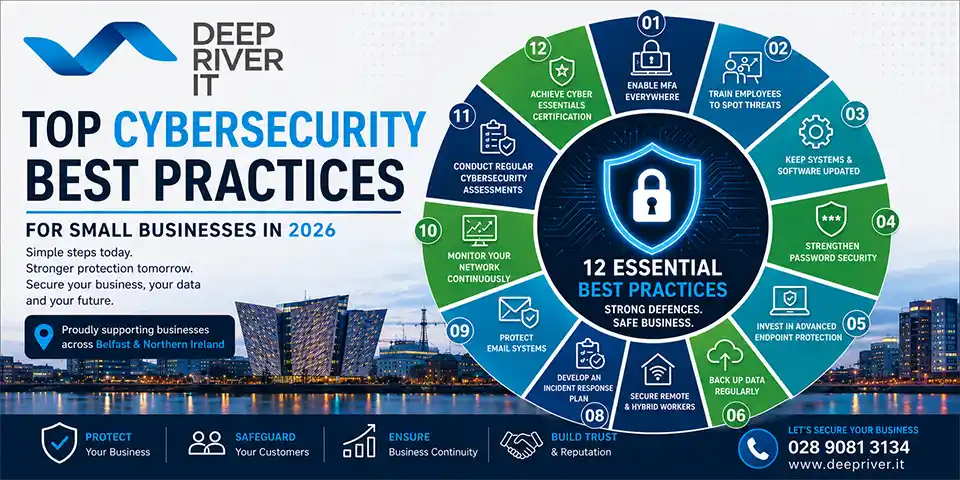
Cybersecurity is no longer just an IT issue—it’s a business survival issue.
As cybercriminals become more sophisticated, small and medium-sized businesses (SMEs) across Belfast and Northern Ireland are increasingly being targeted. Many business owners assume hackers focus only on large corporations, but in reality, SMEs are often seen as easier targets due to limited resources, outdated systems, and weaker security controls.
In 2026, cyber threats continue to evolve rapidly. From ransomware attacks and phishing scams to business email compromise and AI-powered cybercrime, organisations must take proactive steps to protect their systems, employees, and customers.
This guide outlines the most important cybersecurity best practices every small business should implement in 2026 to reduce risk, improve resilience, and maintain customer trust.
Why Cybersecurity Matters More Than Ever in 2026
Modern businesses rely heavily on technology to operate efficiently. Whether you’re managing customer data, processing payments, collaborating remotely, or using cloud-based applications, your digital infrastructure is critical to business success.
Unfortunately, cybercriminals know this.
Common threats facing SMEs today include:
- Phishing attacks
- Ransomware infections
- Password theft
- Business email compromise
- Data breaches
- Supply chain attacks
- AI-generated scams
- Insider threats
Cybersecurity Risk Snapshot
┌────────────────────────────────────┐
│ TOP THREATS TO SMEs IN 2026        │
├────────────────────────────────────┤
│ Phishing & Email Attacks      35%  │
│ Ransomware                    25%  │
│ Credential Theft              15%  │
│ Cloud Misconfiguration        10%  │
│ Insider Threats               8%   │
│ Other                         7%   │
└────────────────────────────────────┘
The financial impact of a cyberattack can be devastating, particularly for smaller businesses that may struggle to recover from prolonged downtime, data loss, or reputational damage.
1. Implement Multi-Factor Authentication (MFA) Everywhere
One of the simplest and most effective security measures is Multi-Factor Authentication (MFA).
MFA requires users to provide an additional form of verification beyond their password, such as:
- Mobile authentication apps
- Security keys
- SMS codes
- Biometric authentication
Even if a password is stolen, MFA significantly reduces the likelihood of unauthorised access.
Prioritise MFA for:
- Microsoft 365 accounts
- Email systems
- VPN access
- Remote desktop services
- Cloud applications
- Financial systems
If your business does only one cybersecurity improvement this year, implementing MFA should be at the top of the list.
2. Train Employees to Recognise Cyber Threats
Employees remain the first line of defence—and often the weakest link.
Cybercriminals increasingly use social engineering techniques to trick staff into:
- Opening malicious attachments
- Clicking harmful links
- Sharing passwords
- Transferring funds
- Revealing sensitive information
Signs of a phishing email:
✓ Unexpected urgency
✓ Suspicious sender addresses
✓ Requests for payment changes
✓ Unusual login requests
✓ Poor grammar or spelling
✓ Unexpected attachments
Security Awareness Training Checklist
✓ Quarterly phishing simulations
✓ Annual cybersecurity training
✓ Password security education
✓ Incident reporting procedures
✓ Remote working security guidance
✓ AI-generated scam awareness
Regular employee training can dramatically reduce the success rate of phishing attacks.
3. Keep Systems and Software Updated
Outdated software is one of the most common causes of successful cyberattacks.
Software vendors regularly release security updates to address newly discovered vulnerabilities. Delaying updates gives attackers more opportunities to exploit weaknesses.
Ensure regular updates for:
- Windows devices
- Microsoft 365
- Servers
- Firewalls
- Antivirus software
- Business applications
- Mobile devices
- Network equipment
Best Practice
Implement automated patch management wherever possible to ensure updates are applied consistently across your organisation.
4. Strengthen Password Security
Weak passwords continue to be a major security risk.
Many businesses still rely on passwords that are:
- Easily guessed
- Reused across systems
- Shared between employees
- Stored insecurely
Password Best Practices
Use:
✓ Long passphrases
✓ Unique passwords for every account
✓ Password managers
✓ MFA protection
Avoid:
✗ “Password123”
✗ Company names
✗ Birthdays
✗ Shared credentials
Password Security Formula
LONG + UNIQUE + MFA = STRONG SECURITYModern password managers can generate and securely store complex passwords for employees.
5. Invest in Advanced Endpoint Protection
Traditional antivirus solutions are no longer enough.
Modern threats require advanced endpoint protection capable of detecting:
- Ransomware
- Fileless attacks
- Malware
- Suspicious behaviour
- Zero-day threats
Endpoint Security Should Include:
- Antivirus protection
- Behaviour monitoring
- Threat detection
- Device management
- Automated response
- Threat intelligence
Businesses should ensure all laptops, desktops, and servers are protected by enterprise-grade endpoint security solutions.
6. Back Up Data Regularly
Backups remain one of the most effective safeguards against ransomware and accidental data loss.
Without reliable backups, recovering from an attack can be expensive, time-consuming, or impossible.
Follow the 3-2-1 Backup Rule
3 Copies of Data
        ↓
2 Different Storage Types
        ↓
1 Offsite Backup
Backup Best Practices
- Daily backups
- Automated backup schedules
- Cloud backup solutions
- Backup encryption
- Regular recovery testing
A backup that has never been tested should not be considered reliable.
7. Secure Remote and Hybrid Workers
Hybrid working is now a permanent part of business operations for many organisations.
Unfortunately, remote workers often introduce additional security risks.
Common Risks
- Unsecured home networks
- Personal devices
- Weak passwords
- Public Wi-Fi usage
- Unmanaged applications
Remote Working Security Checklist
✓ VPN access
✓ MFA enabled
✓ Endpoint protection
✓ Device encryption
✓ Cloud security controls
✓ Mobile device management
✓ Secure file sharing
Businesses should apply the same security standards to remote workers as they do within the office.
8. Develop an Incident Response Plan
Every business should assume that a cyber incident will occur at some point.
The question is not if, but when.
A documented incident response plan helps minimise disruption and ensures employees know how to respond.
Incident Response Process
DETECT
  ↓
CONTAIN
  ↓
INVESTIGATE
  ↓
RECOVER
  ↓
IMPROVE
Include:
- Key contacts
- Escalation procedures
- Recovery processes
- Communication plans
- Regulatory obligations
Preparation significantly reduces recovery time and business impact.
9. Protect Email Systems
Email remains the most common entry point for cyberattacks.
Business email compromise (BEC) continues to cost organisations millions each year.
Email Security Best Practices
- MFA on all mailboxes
- Anti-phishing protection
- Email filtering
- DMARC implementation
- SPF configuration
- DKIM configuration
- User awareness training
These technologies help prevent spoofing and reduce malicious email delivery.
10. Monitor Your Network Continuously
Cybersecurity should not be a “set and forget” exercise.
Continuous monitoring enables businesses to identify threats before they become major incidents.
Monitoring Should Include:
- Server monitoring
- Network monitoring
- Security alerts
- Device health
- Login activity
- Backup status
- Vulnerability detection
Cybersecurity Maturity Model
Level 1: Reactive
Fixing problems after attacks

Level 2: Protected
Basic antivirus and firewalls

Level 3: Managed
Monitoring and patching

Level 4: Proactive
Threat detection and response

Level 5: Resilient
Continuous improvement and testing
The goal for most SMEs should be to reach Levels 4 and 5.
11. Conduct Regular Cybersecurity Assessments
Cyber threats evolve constantly.
What protected your business two years ago may no longer be sufficient today.
Annual Security Reviews Should Cover:
- Firewall configurations
- User permissions
- Backup systems
- Cloud services
- Microsoft 365 security
- Endpoint protection
- Compliance requirements
A professional cybersecurity assessment can identify weaknesses before cybercriminals do.
12. Achieve Cyber Essentials Certification
For businesses operating in the UK, Cyber Essentials provides an excellent baseline security framework.
Benefits include:
- Improved security posture
- Demonstrable commitment to security
- Competitive advantage in tenders
- Reduced cyber risk
- Increased customer confidence
Many organisations now expect suppliers to meet recognised cybersecurity standards.
Cybersecurity Priorities for SMEs in 2026
If You Only Focus on Five Things This Year
1. Enable MFA Everywhere
2. Train Employees Regularly
3. Maintain Reliable Backups
4. Keep Systems Updated
5. Monitor Your Environment Continuously
These five actions alone can significantly reduce your exposure to common cyber threats.
Final Thoughts
Cybersecurity is no longer optional for small businesses. The threat landscape in 2026 continues to evolve, and organisations that fail to adapt risk financial loss, operational disruption, and reputational damage.
The good news is that most successful cyberattacks can be prevented through a combination of technology, employee awareness, and proactive management.
By implementing the cybersecurity best practices outlined in this guide, businesses can strengthen their defences, improve resilience, and operate with greater confidence in an increasingly digital world.
Need Help Improving Your Cybersecurity?
Deep River IT provides managed cybersecurity services, IT support, Microsoft 365 security, backup solutions, and proactive monitoring for businesses across Belfast, Lisburn, and Northern Ireland.
Whether you need a cybersecurity review, Cyber Essentials guidance, endpoint protection, or a fully managed IT security solution, our experienced team can help protect your business from modern cyber threats.
Contact Deep River IT today to arrange a FREE cybersecurity assessment and discover how we can help keep your business secure in 2026 and beyond.